Topic: Position of sorticon in datatble

*Expected behavior*Looking for a way to adjust / move the sort icon in column headers
*Actual behavior*Can't fiind a way to achieve this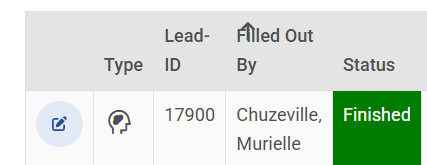
Resources (screenshots, code snippets etc.)
<div class="table-responsive mt-4">
  <table class="leadtable table datatable-table table-striped table-bordered table-sm" mdbTable mdbTableSort
    #table="mdbTable" #sort="mdbTableSort" [dataSource]="dataSource" [pagination]="pagination" [sort]="sort">
    <thead class="datatable-header">
      <tr>
        @for (header of headers; track $index) {
        <th [mdbTableSortHeader]="header" scope="col">
          {{ header | titlecase }}
        </th>
        }
      </tr>
    </thead>
    <tbody class="datatable-body">
      @for (data of table.data; track $index) {
      <tr scope="row">
        <td>
          {{ data.name }}
        </td>
        <td>
          {{ data.position }}
        </td>
        <td>
          {{ data.office }}
        </td>
        <td>
          {{ data.age }}
        </td>
        <td>
          {{ data.startDate }}
        </td>
        <td>
          {{ data.salary }}
        </td>
      </tr>
      }
    </tbody>
  </table>
  <mdb-table-pagination #pagination></mdb-table-pagination>
</div>
FREE CONSULTATION
Hire our experts to build a dedicated project. We'll analyze your business requirements, for free.
Open
- User: Pro
- Premium support: Yes
- Technology: MDB Angular
- MDB Version: MDB5 9.1.0
- Device: Laptop
- Browser: Chrome
- OS: Win11
- Provided sample code: No
- Provided link: No
Arkadiusz Idzikowski staff commented 6 months ago
How exactly would you like it to look like? Where do you want to move the icon?
The icon has class
.datatable-sort-iconand usesleftandtopstyles for the position (it has position absolute and those left/top parameters are relative to the table heading).pro premium priority commented 6 months ago
It woiuld be nic e it somehow a margin to the columns text could be set - but I guess this is out of question consideriung the position:absolute. If you look at my screenshot, the requirement is simple: the header text shouldn't cover the icon, and vice versa.
Arkadiusz Idzikowski staff commented 6 months ago
Could you please edit your first post and provide a simple part of your HTML/CSS code so we can reproduce the exact same layout on our end? It seems like you use some custom styles and the arrow position was adjusted to our datatable layout.
pro premium priority commented 6 months ago
Done, it's a Test Page using your example datasource dataSource: Person[] = [ { name: 'Tiger Nixon', position: 'System Architect', office: 'Edinburgh', age: 61, startDate: '2011/04/25', salary: '$320,800', },... ]
Arkadiusz Idzikowski staff commented 6 months ago
The HTML is similar to the code from the Datatable examples in our docs, but the table in the screenshot doesn't look like MDB Angular table. Do you use any custom CSS styles?
I think you need to use
class="datatable"instead ofclass="table-responsive"for thedivwrapper element. Otherwise styles relevant for the sort arrow positioning won't be applied to the table headings. Please take a look at the HTML in one of the examples from our documentation: https://mdbootstrap.com/docs/angular/data/datatables/#section-basic-example